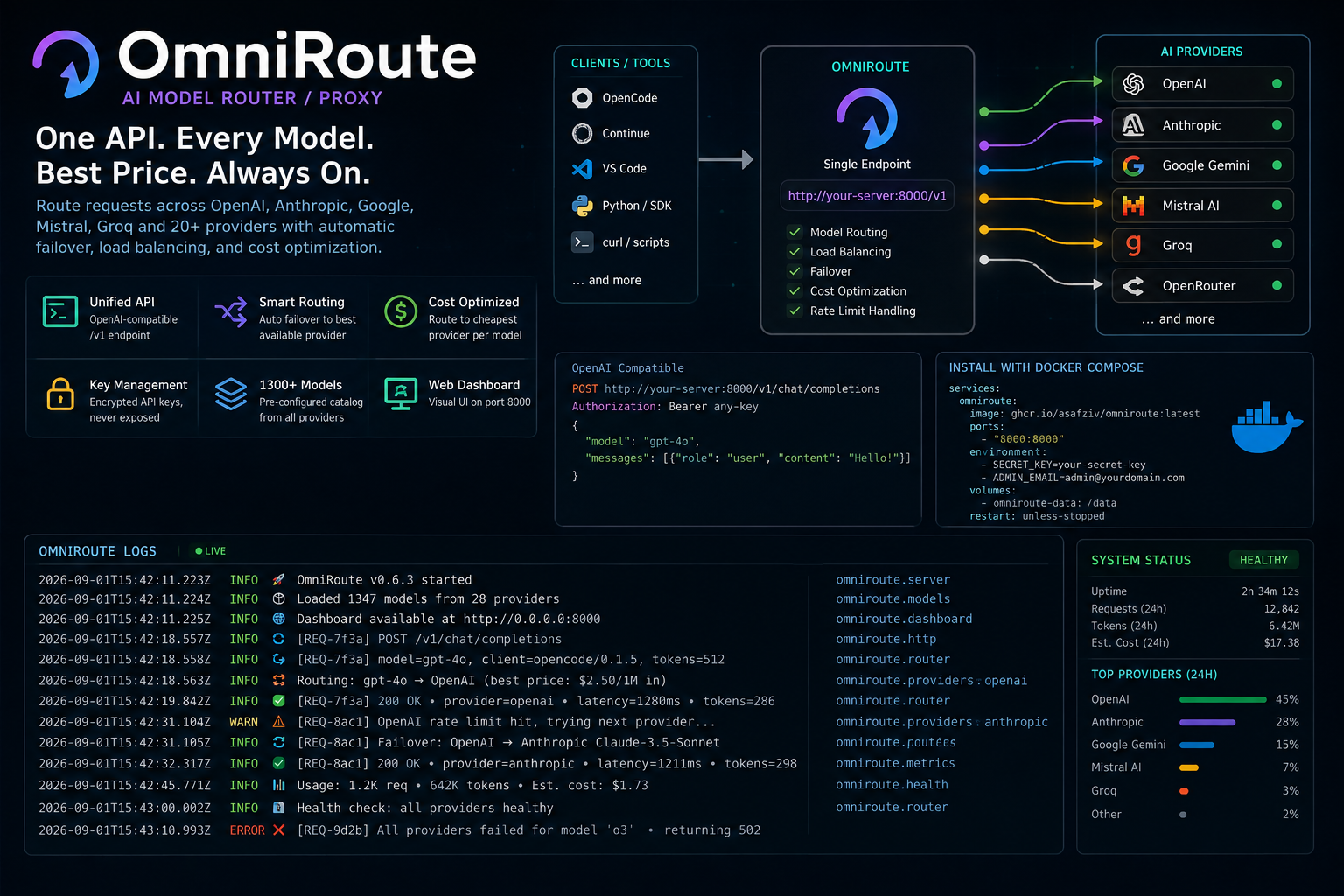
OmniRoute — Install and Configure Your AI Model Router
Running AI tools means juggling API keys for OpenAI, Anthropic, Google, Mistral, and a dozen other providers — each with different pricing, rate limits, and model names. OmniRoute sits in front of all of them with a single API endpoint, unified model naming, and automatic failover.
I run OmniRoute as a Docker container on my homelab, routing requests from OpenCode, Continue, and custom scripts to whichever provider has the best model available at the lowest cost. This guide walks through installing OmniRoute via Docker Compose, configuring providers, setting up model routing, and integrating with OpenCode.
What It Is
| Platform | OmniRoute (AI model router/proxy) |
| Purpose | Unified API gateway for multiple AI providers |
| License | Open source |
| Protocol | OpenAI-compatible API |
| Port | 8000 (default) |
| Repository | github.com/AsafZiv/OmniRoute |
What You Get
| Feature | Details |
|---|---|
| Unified API | Single /v1/chat/completions endpoint for all providers |
| Model Routing | Automatic failover between providers |
| Load Balancing | Distribute requests across multiple API keys |
| Cost Optimization | Route to cheapest provider per model |
| Key Management | Store API keys encrypted, never exposed to clients |
| Web Dashboard | Visual config UI on port 8000 |
| 1300+ Models | Pre-configured model catalog from all providers |
The Core Problem: Too Many API Keys
| Provider | Models | API Key Format | Pricing |
|---|---|---|---|
| OpenAI | GPT-4o, o3, o4-mini | sk-... |
$2.50–$15/1M tokens |
| Anthropic | Claude Sonnet 4, Opus 4 | sk-ant-... |
$3–$15/1M tokens |
| Gemini 2.5 Pro, Flash | AIza... |
$0.075–$1.25/1M tokens | |
| Mistral | Codestral, Mistral Large | mist-... |
$0.10–$0.30/1M tokens |
| Groq | Llama 3, Mixtral | gsk_... |
Free tier available |
| OpenRouter | All of the above | sk-or-... |
Varies by model |
Without OmniRoute, every tool needs its own provider config. With OmniRoute, every tool points to http://your-server:8000/v1 and OmniRoute handles routing.
- Before OmniRoute
- After OmniRoute
Step 0 — Requirements
| Component | Minimum |
|---|---|
| Server | Any Linux box with Docker |
| RAM | 512 MB |
| Storage | 1 GB |
| Network | Port 8000 accessible to clients |
| API Keys | At least one provider key (OpenAI, Anthropic, etc.) |
Step 1 — Install with Docker Compose
Create Directory
mkdir -p /opt/omniroute
cd /opt/omniroute
Create docker-compose.yml
version: "3.8"

services:
  omniroute:
    image: ghcr.io/asafziv/omniroute:latest
    container_name: omniroute
    ports:
      - "8000:8000"
    environment:
      - SECRET_KEY=your-secret-key-here-change-this
      - DATABASE_URL=sqlite:///data/omniroute.db
      - ADMIN_EMAIL=admin@yourdomain.com
    volumes:
      - omniroute-data:/data
    restart: unless-stopped

volumes:
  omniroute-data:
Launch
docker compose up -d

# Check status
docker compose ps
docker compose logs -f omniroute
Access Dashboard
Open http://YOUR_SERVER_IP:8000 in your browser.
Default credentials:
- Email: admin@yourdomain.com (from ADMIN_EMAIL)
- Password: Set on first login
Step 2 — Add API Providers
Via Dashboard
- Open
http://YOUR_SERVER_IP:8000 - Go to Providers or Settings → API Keys
- Add your provider keys:
| Provider | Key Format | Dashboard Field |
|---|---|---|
| OpenAI | sk-... |
OpenAI API Key |
| Anthropic | sk-ant-... |
Anthropic API Key |
AIza... |
Google API Key | |
| Mistral | mist-... |
Mistral API Key |
| Groq | gsk_... |
Groq API Key |
| OpenRouter | sk-or-... |
OpenRouter API Key |
Via API
curl -X POST http://localhost:8000/api/v1/providers \
  -H "Content-Type: application/json" \
  -H "Authorization: Bearer YOUR_ADMIN_TOKEN" \
  -d '{
    "name": "openai",
    "api_key": "sk-your-openai-key",
    "enabled": true
  }'
Step 3 — Model Routing
Auto-Routing
OmniRoute automatically routes requests to the best available provider:
# Request any model — OmniRoute finds the cheapest/fastest provider
curl http://localhost:8000/v1/chat/completions \
  -H "Content-Type: application/json" \
  -d '{
    "model": "auto/best-coding",
    "messages": [{"role": "user", "content": "Hello"}]
  }'
Model Aliases
| Alias | Routes To |
|---|---|
auto/best-coding |
Best coding model available |
auto/best-chat |
Best chat model available |
auto/best-reasoning |
Best reasoning model available |
auto/best-fast |
Fastest model available |
auto/best-free |
Best free model available |
auto/cheap |
Cheapest model available |
Provider-Specific Models
# Route to specific provider
curl http://localhost:8000/v1/chat/completions \
  -d '{
    "model": "openai/gpt-4o",
    "messages": [{"role": "user", "content": "Hello"}]
  }'

curl http://localhost:8000/v1/chat/completions \
  -d '{
    "model": "anthropic/claude-sonnet-4-20250514",
    "messages": [{"role": "user", "content": "Hello"}]
  }'
Step 4 — Integrate with OpenCode
Update opencode.jsonc
{
  "$schema": "https://opencode.ai/config.json",
  "model": "omniroute/auto/best-coding",
  "provider": {
    "omniroute": {
      "npm": "@ai-sdk/openai-compatible",
      "name": "Omniroute",
      "options": {
        "baseURL": "http://YOUR_SERVER_IP:8000/api/v1",
        "apiKey": "your-omniroute-api-key"
      }
    }
  }
}
Restart OpenCode
Quit and restart OpenCode for the config to take effect.
Step 5 — Integrate with Other Tools
Continue (VS Code Extension)
{
  "models": [{
    "title": "OmniRoute",
    "provider": "openai",
    "model": "auto/best-coding",
    "apiBase": "http://YOUR_SERVER_IP:8000/v1",
    "apiKey": "your-omniroute-api-key"
  }]
}
Python (OpenAI SDK)
from openai import OpenAI

client = OpenAI(
    base_url="http://YOUR_SERVER_IP:8000/v1",
    api_key="your-omniroute-api-key"
)

response = client.chat.completions.create(
    model="auto/best-coding",
    messages=[{"role": "user", "content": "Hello"}]
)
curl (Any Provider)
curl http://YOUR_SERVER_IP:8000/v1/chat/completions \
  -H "Authorization: Bearer your-omniroute-api-key" \
  -H "Content-Type: application/json" \
  -d '{
    "model": "auto/best-coding",
    "messages": [{"role": "user", "content": "Write a Python hello world"}],
    "stream": true
  }'
Step 6 — Security
API Key Management
- Never expose OmniRoute to the internet without authentication
- Use strong
SECRET_KEY(64+ random characters) - Generate per-tool API keys (don't share the master key)
- Rotate keys periodically
Firewall
# Only allow internal network access
sudo ufw allow from 192.168.0.0/16 to any port 8000

# Or specific IPs
sudo ufw allow from 192.168.1.100 to any port 8000
Reverse Proxy (HTTPS)
# /etc/nginx/sites-available/omniroute
server {
    listen 443 ssl;
    server_name omniroute.yourdomain.com;

    ssl_certificate /etc/letsencrypt/live/yourdomain.com/fullchain.pem;
    ssl_certificate_key /etc/letsencrypt/live/yourdomain.com/privkey.pem;

    location / {
        proxy_pass http://127.0.0.1:8000;
        proxy_set_header Host $host;
        proxy_set_header X-Real-IP $remote_addr;
        proxy_set_header X-Forwarded-For $proxy_add_x_forwarded_for;
        proxy_set_header X-Forwarded-Proto $scheme;

        # WebSocket support (for streaming)
        proxy_http_version 1.1;
        proxy_set_header Upgrade $http_upgrade;
        proxy_set_header Connection "upgrade";
    }
}
Step 7 — Monitoring
View Logs
docker compose logs -f omniroute
API Health Check
curl http://localhost:8000/v1/models | python3 -m json.tool | head -20
Dashboard Stats
The web dashboard shows: - Request count per provider - Token usage per model - Error rates - Latency per provider - Cost estimation
What I'd Tell Anyone Building One
-
Start with OpenRouter if you have no provider keys. OpenRouter gives you access to 100+ models with a single API key and free tiers for many models. Point OmniRoute to OpenRouter and you're running in 5 minutes.
-
Use
auto/best-codingas your default. OmniRoute automatically selects the best available coding model based on quality, speed, and cost. You don't need to pick specific models — the router does it for you. -
The
SECRET_KEYis critical. It signs authentication tokens and encrypts stored API keys. If it leaks, your provider keys are exposed. Generate a strong random key and store it in a password manager. -
Streaming works but needs WebSocket support. If you're behind Nginx, make sure you've configured
proxy_http_version 1.1andUpgradeheaders. Without them, streaming responses will timeout. -
Monitor costs via the dashboard. OmniRoute tracks token usage per provider. Check the dashboard weekly to catch unusual spending before it becomes a problem.
-
Multiple API keys = redundancy. Add the same provider twice with different keys. If one hits rate limits, OmniRoute automatically fails over to the second key.
Get It
- OmniRoute: github.com/AsafZiv/OmniRoute
- Docker Image:
ghcr.io/asafziv/omniroute:latest - OpenCode: opencode.ai
- Continue: continue.dev
Last updated: 2026-09-01 — Tested with OmniRoute latest, Docker 27.x, OpenCode with @ai-sdk/openai-compatible.