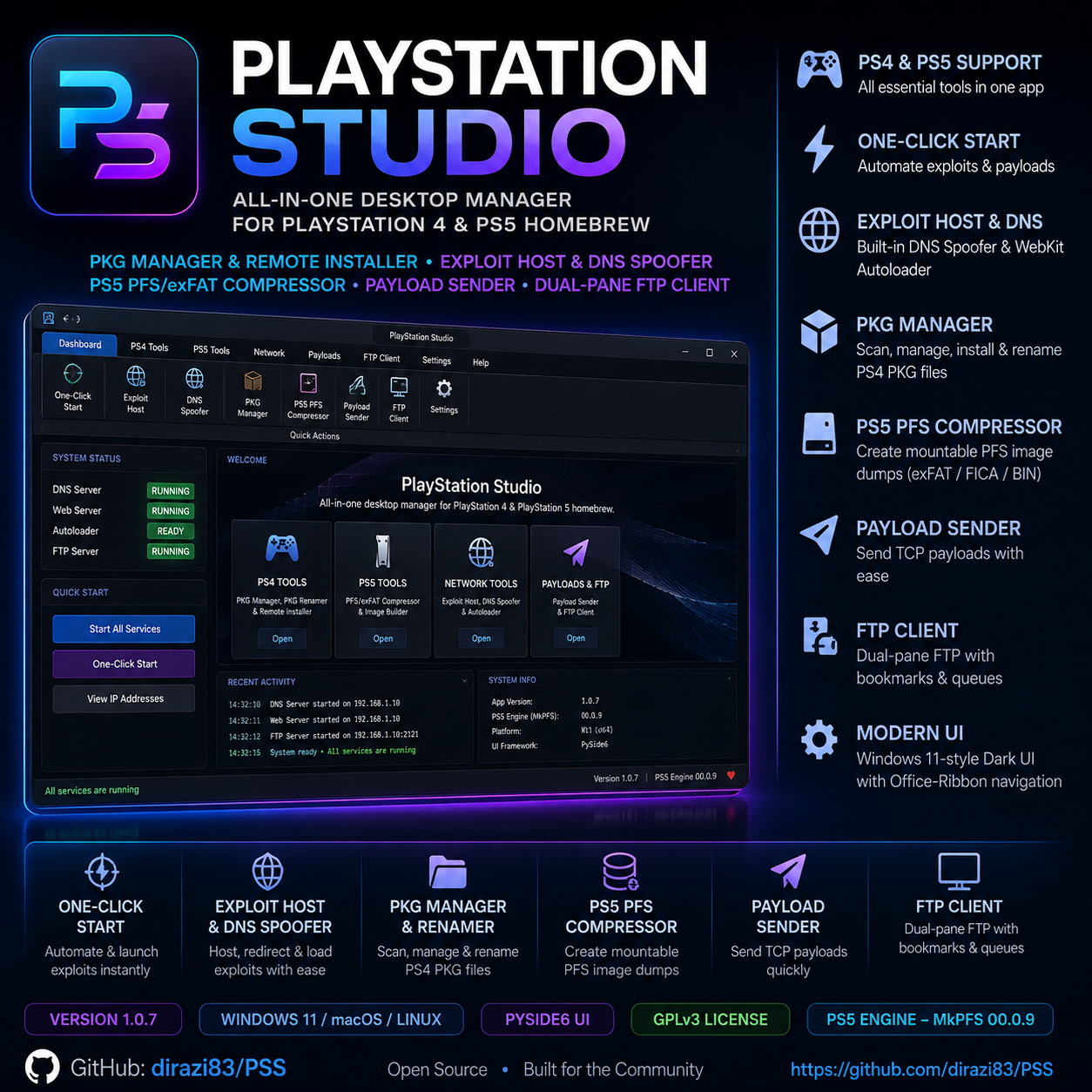
PlayStation Studio is a desktop application I built to unify all the separate tools I use for PS4 and PS5 homebrew management into a single, cohesive interface. Before this, I was running five different command-line tools, terminal windows, and separate FTP clients just to manage my console backups and deploy exploits. This app ended that.
What it is
A native desktop application for managing PlayStation 4 and PlayStation 5 homebrew workflows. It handles PKG installation, exploit hosting, DNS spoofing, PFS image compression, payload delivery, and file transfers — all from one Windows 11-style interface built with PySide6.
| Language | Python 3.11+ |
| Framework | PySide6 (Qt6) |
| Platforms | Windows, macOS (Apple Silicon), Linux |
| License | GPLv3 |
| Repository | github.com/dirazi83/PSS |
The app is designed around a horizontal ribbon-style navigation bar — the same pattern used in Microsoft Office — with sections for PKG Manager, Exploit Host, PKG Renamer, PS5 Compressor, Payload Sender, and an FTP client. Keyboard shortcuts (Ctrl+1 through Ctrl+6) let you jump between sections without touching the mouse.
The problem it solves
Homebrew on PlayStation consoles involves a lot of moving parts. To exploit a console you need:
- A local HTTP server serving exploit pages
- A DNS responder that maps PlayStation domains to your PC
- A HTTPS server for the PS5 WebKit autoloader
- A PKG installer that talks to the console's flatz service
- An FTP client for file transfers
- A PFS compressor for building mountable game images
Before PSS, I ran all of these as separate processes. The exploit host required editing /etc/hosts, starting dnsmasq manually, running a Python HTTP server in one terminal, and the PS5 autoloader in another. It worked, but it was fragile — one wrong port and the whole chain broke.
PSS bundles all of this behind a single Start Everything button. The app detects your LAN IP, checks port availability (HTTP 80, DNS UDP 53, HTTPS 443), starts the HTTP server as an unprivileged process, and then runs the DNS responder and WebKit autoloader together in a single elevated process — so you only see one UAC or polkit prompt instead of three.
One-click DNS spoofing
The DNS responder works like a local Pi-hole for PlayStation. It maintains a table of known PlayStation domains — telemetry endpoints, update servers, manual URLs — and resolves them all to your PC's LAN IP. Any domain not in the table returns NXDOMAIN, which blocks outbound console traffic and prevents accidental firmware updates.
Here's what a typical DNS response chain looks like:
| PSS DNS | Console | PSS HTTP | ||
|---|---|---|---|---|
| 192.168.1.X (spoofed) | ||||
| exploit page HTML | ||||
The DNS responder has no external dependencies. It's a pure Python UDP socket server that reads a JSON config file and responds to queries from the ~/.playstation_studio/host/dns/ directory. You can add custom domains, toggle entries on and off, and export the table.
PS5 PFS compression
The PS5 compressor is the most technically interesting part of the app. It uses MkPFS 0.0.9 (by PSBrew) as its engine to convert raw game dumps into mountable PFS images. Three output formats are supported:
- Format
- .ffpfsc (Compressed PFS)
- Compression
- zlib-ng (levels 0–9)
- Use case
- Maximum storage savings, mountable under ShadowMountPlus
- Format
- .ffpfs (Uncompressed PFS)
- Compression
- None
- Use case
- Fastest build time and maximum read speed on console
- Format
- .exfat (Raw exFAT)
- Compression
- N/A (pure-Python filesystem)
- Use case
- Cross-platform mounting without OS drivers
The compressor handles large game dumps (50–100 GB) with configurable CPU thread allocation and a memory-saver mode that streams data instead of buffering it all in RAM. There's also an option to store executable binaries (.elf files) uncompressed so they load faster on console.
PKG management
The PKG manager scans a directory of .pkg files and reads param.sfo metadata to extract the title, CUSA ID, content ID, app version, category, region, system version, and supported languages. It also extracts embedded cover art and displays it as thumbnails.
Packages are sorted into Games, Updates, and DLC tabs. When you select a game, the app automatically queues its associated update and DLC packages — so you can install everything with one click.
Sending packages to the console uses the flatz Remote PKG Installer protocol over HTTP (port :12800). The app decodes PS4 error codes in real time, so when you see 0x80990015 you know immediately that the package is already installed.
What I'd tell anyone building one
Don't build a tool until you've used the separate tools enough to know what friction to remove. PSS exists because I was tired of context-switching between six different terminals. Every feature in it solves a real annoyance I encountered while doing the same workflow repeatedly.
Elevation is the hardest part on cross-platform apps. Windows UAC, macOS Touch ID, Linux polkit — each has different behaviour and timeout rules. PSS handles it by batching the DNS and HTTPS servers into a single elevated child process instead of prompting three times. It's more complex to implement but the UX is worth it.
Pure-Python filesystems are slower than you think. The exFAT writer in PSS is entirely in Python — no external libraries, no native code. It works, but building a 100 GB image can take hours. If you're doing this for real, consider offloading to a C library or using pre-built tools like mkexfatfs.
Ship with bundled mirrors. PSS includes offline copies of the PS4 and PS5 exploit hosts, pre-reskinned with a glassmorphism CSS overlay. This means the app works on the first launch without any network connection — which is exactly when you need it most, because your console exploit usually requires an offline environment anyway.
Get it
The app is open source under GPLv3. Pre-built binaries for Windows, macOS, and Linux are available on the releases page. To run from source:
git clone https://github.com/dirazi83/PSS.git
cd PSS
python -m pip install -r requirements.txt
python -m pip install ./MkPFS
python -m playstation_studio
To build a standalone executable with PyInstaller:
python -m playstation_studio.assets.build_icons
pyinstaller --noconfirm playstation_studio.spec
The app is designed for managing your own legally-owned backups on consoles you own. It contains no copyrighted console code, ships no game content, and bypasses no DRM.