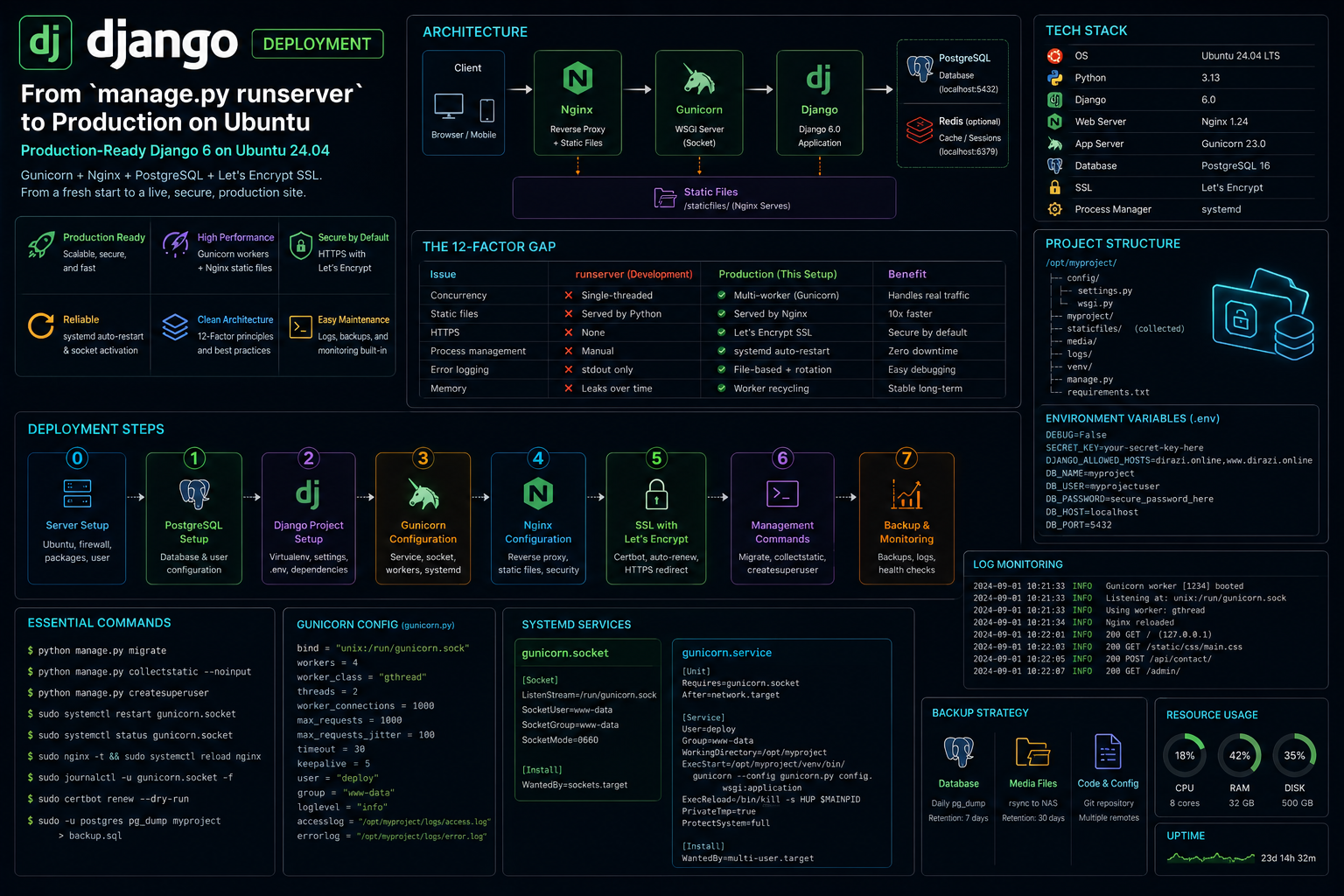
Django Deployment — From manage.py runserver to Production on Ubuntu
manage.py runserver is for development. It's single-threaded, serves static files through Python, and leaks memory under load. If your site is live on a public domain, you need Gunicorn behind Nginx with PostgreSQL and SSL.
I deployed dirazi.online on a single Ubuntu 24.04 server with Django 6, Gunicorn (systemd socket activation), Nginx reverse proxy, PostgreSQL, Let's Encrypt SSL, and static file collection. The entire stack runs on one box and handles blog traffic, API calls, and admin access. This guide walks through every step — from a fresh django-admin startproject to a production-ready site.
What It Is
| Stack | Django 6.0 + Gunicorn + Nginx + PostgreSQL |
| Platform | Ubuntu 24.04 LTS |
| Domain | dirazi.online (Let's Encrypt SSL) |
| Python | 3.13 |
| Process Manager | systemd (socket-activated Gunicorn) |
| Static Files | Collected to /staticfiles/, served by Nginx |
| Repository | Private |
Architecture
| Django | PostgreSQL (localhost | Redis (localhost | ||
|---|---|---|---|---|
| 5432) | ||||
| 6379, optional) | ||||
The Core Problem: The 12-Factor Gap
Django's runserver is convenient but broken for production:
| Issue | runserver |
Production |
|---|---|---|
| Concurrency | Single-threaded | Multi-worker (Gunicorn) |
| Static files | Python serves them | Nginx serves them (10x faster) |
| HTTPS | None | Let's Encrypt + Nginx |
| Process management | Manual | systemd auto-restart |
| Error logging | stdout only | File-based with rotation |
| Memory | Leaks over time | Worker recycling |
The gap between "it works on my machine" and "it works in production" is exactly what this guide closes.
- Server
- Ubuntu 24.04 LTS (minimal install)
- Web Server
- Nginx 1.24 (reverse proxy + static files)
- App Server
- Gunicorn 23.0 (WSGI, unix socket)
- Framework
- Django 6.0
- Database
- PostgreSQL 16
- Python
- 3.13 (venv)
- SSL
- Let's Encrypt (certbot)
- Process Manager
- systemd
Step 0 — Server Setup
Fresh Ubuntu Install
# Update system
sudo apt update && sudo apt upgrade -y

# Install essentials
sudo apt install -y python3 python3-pip python3-venv \
  python3-dev libpq-dev postgresql postgresql-contrib \
  nginx certbot python3-certbot-nginx \
  git curl ufw

# Create deploy user (never run Django as root)
sudo adduser --disabled-password --gecos "" deploy
sudo usermod -aG sudo deploy
Firewall
sudo ufw allow OpenSSH
sudo ufw allow 'Nginx Full'
sudo ufw enable
Step 1 — PostgreSQL Setup
# Switch to postgres user
sudo -u postgres psql

# Create database and user
CREATE DATABASE myproject;
CREATE USER myprojectuser WITH PASSWORD 'secure_password_here';
ALTER ROLE myprojectuser SET client_encoding TO 'utf8';
ALTER ROLE myprojectuser SET default_transaction_isolation TO 'read committed';
ALTER ROLE myprojectuser SET timezone TO 'UTC';
GRANT ALL PRIVILEGES ON DATABASE myproject TO myprojectuser;
\q
Django Database Config
# config/settings.py
DATABASES = {
    'default': {
        'ENGINE': 'django.db.backends.postgresql',
        'NAME': 'myproject',
        'USER': 'myprojectuser',
        'PASSWORD': 'secure_password_here',
        'HOST': 'localhost',
        'PORT': '',
    }
}
Step 2 — Django Project Setup
Create Virtual Environment
# Switch to deploy user
sudo su - deploy

# Clone your repo
git clone https://github.com/yourusername/yourproject.git
cd yourproject

# Create venv
python3 -m venv env
source env/bin/activate

# Install dependencies
pip install -r requirements.txt
pip install gunicorn psycopg2-binary
Settings for Production
# config/settings.py

import os
from pathlib import Path

BASE_DIR = Path(__file__).resolve().parent.parent

# SECURITY
DEBUG = False
SECRET_KEY = os.environ.get('DJANGO_SECRET_KEY', 'fallback-key-change-me')
ALLOWED_HOSTS = ['dirazi.online', 'www.dirazi.online', '127.0.0.1']

# Static files
STATIC_URL = '/static/'
STATIC_ROOT = BASE_DIR / 'staticfiles'
STATICFILES_DIRS = [BASE_DIR / 'blog' / 'static']

# Media files
MEDIA_URL = '/media/'
MEDIA_ROOT = BASE_DIR / 'media'

# Security headers
SECURE_SSL_REDIRECT = True
SECURE_HSTS_SECONDS = 31536000
SECURE_HSTS_INCLUDE_SUBDOMAINS = True
SECURE_HSTS_PRELOAD = True
SESSION_COOKIE_SECURE = True
CSRF_COOKIE_SECURE = True
X_FRAME_OPTIONS = 'DENY'
Environment Variables
# /home/deploy/.env (never commit this)
DJANGO_SECRET_KEY=your-50-char-random-secret-key
DJANGO_SETTINGS_MODULE=config.settings
DATABASE_URL=postgres://myprojectuser:secure_password_here@localhost/myproject
Step 3 — Gunicorn Configuration
Test Gunicorn Manually
cd /home/deploy/yourproject
source env/bin/activate

# Test with 3 workers
gunicorn --workers 3 --bind 127.0.0.1:8000 config.wsgi:application

# Test with unix socket
gunicorn --workers 3 --bind unix:/run/gunicorn.sock config.wsgi:application
Gunicorn Config File
# gunicorn_config.py
import multiprocessing

bind = "unix:/run/gunicorn.sock"
workers = multiprocessing.cpu_count() * 2 + 1
worker_class = "sync"
timeout = 120
keepalive = 5
max_requests = 1000
max_requests_jitter = 50
accesslog = "/var/log/gunicorn/access.log"
errorlog = "/var/log/gunicorn/error.log"
loglevel = "info"
systemd Service
# /etc/systemd/system/gunicorn.service
[Unit]
Description=Gunicorn daemon for myproject
Requires=gunicorn.socket
After=network.target

[Service]
User=deploy
Group=deploy
WorkingDirectory=/home/deploy/yourproject
ExecStart=/home/deploy/yourproject/env/bin/gunicorn \
  --config gunicorn_config.py \
  config.wsgi:application
ExecReload=/bin/kill -s HUP $MAINPID
Restart=on-failure
RestartSec=5

[Install]
WantedBy=multi-user.target
Socket Activation
# /etc/systemd/system/gunicorn.socket
[Unit]
Description=Gunicorn socket

[Socket]
ListenStream=/run/gunicorn.sock
SocketUser=www-data
SocketGroup=www-data
SocketMode=0660

[Install]
WantedBy=sockets.target
Enable and Start
sudo systemctl daemon-reload
sudo systemctl enable gunicorn.socket
sudo systemctl start gunicorn.socket
sudo systemctl enable gunicorn
sudo systemctl start gunicorn

# Check status
sudo systemctl status gunicorn
Step 4 — Nginx Configuration
Collect Static Files
cd /home/deploy/yourproject
source env/bin/activate
python manage.py collectstatic --noinput
sudo cp -r staticfiles /home/deploy/staticfiles
sudo chown -R deploy:deploy /home/deploy/staticfiles
Nginx Site Config
# /etc/nginx/sites-available/myproject
server {
    listen 80;
    server_name dirazi.online www.dirazi.online;
    return 301 https://$server_name$request_uri;
}

server {
    listen 443 ssl http2;
    server_name dirazi.online www.dirazi.online;

    ssl_certificate /etc/letsencrypt/live/dirazi.online/fullchain.pem;
    ssl_certificate_key /etc/letsencrypt/live/dirazi.online/privkey.pem;
    include /etc/letsencrypt/options-ssl-nginx.conf;
    ssl_dhparam /etc/letsencrypt/ssl-dhparams.pem;

    # Security headers
    add_header X-Frame-Options "DENY" always;
    add_header X-Content-Type-Options "nosniff" always;
    add_header Strict-Transport-Security "max-age=31536000; includeSubDomains" always;

    # Static files
    location /static/ {
        alias /home/deploy/staticfiles/;
        expires 30d;
        add_header Cache-Control "public, immutable";
    }

    # Media files
    location /media/ {
        alias /home/deploy/yourproject/media/;
        expires 7d;
    }

    # Gunicorn
    location / {
        include proxy_params;
        proxy_pass http://unix:/run/gunicorn.sock;
        proxy_set_header Host $host;
        proxy_set_header X-Real-IP $remote_addr;
        proxy_set_header X-Forwarded-For $proxy_add_x_forwarded_for;
        proxy_set_header X-Forwarded-Proto $scheme;
    }

    # Max upload size
    client_max_body_size 20M;
}
Enable Site
sudo ln -s /etc/nginx/sites-available/myproject /etc/nginx/sites-enabled/
sudo rm /etc/nginx/sites-enabled/default
sudo nginx -t
sudo systemctl reload nginx
Step 5 — SSL with Let's Encrypt
# Get certificate
sudo certbot --nginx -d dirazi.online -d www.dirazi.online

# Verify auto-renewal
sudo certbot renew --dry-run

# Check certbot timer
sudo systemctl status certbot.timer
Step 6 — Management Commands
Common Commands
# Django shell
python manage.py shell

# Run migrations
python manage.py migrate

# Create superuser
python manage.py createsuperuser

# Collect static files
python manage.py collectstatic --noinput

# Check for issues
python manage.py check --deploy

# View logs
sudo journalctl -u gunicorn -f
sudo tail -f /var/log/nginx/access.log
Restart After Code Changes
cd /home/deploy/yourproject
git pull
source env/bin/activate
python manage.py migrate
python manage.py collectstatic --noinput
sudo systemctl restart gunicorn
Step 7 — Backup & Monitoring
Database Backup
#!/bin/bash
# /home/deploy/backup.sh
DATE=$(date +%Y%m%d_%H%M%S)
BACKUP_DIR="/home/deploy/backups"
mkdir -p $BACKUP_DIR

pg_dump -U myprojectuser myproject | gzip > "$BACKUP_DIR/db_$DATE.sql.gz"

# Keep last 7 days
find $BACKUP_DIR -name "db_*.sql.gz" -mtime +7 -delete
chmod +x /home/deploy/backup.sh
# Add to crontab
crontab -e
0 3 * * * /home/deploy/backup.sh
Log Monitoring
# Gunicorn errors
sudo journalctl -u gunicorn --since "1 hour ago"

# Nginx access
sudo tail -f /var/log/nginx/access.log | grep -E "50[0-9]|4[0-9]{2}"

# Django logs (if configured)
tail -f /home/deploy/yourproject/logs/django.log
What I'd Tell Anyone Building One
-
Never run
runserverin production. It's single-threaded, serves static files through Python, and has no process management. Gunicorn with systemd socket activation is the minimum. -
Use unix sockets, not TCP. Nginx and Gunicorn on the same machine communicate faster through a unix socket (
/run/gunicorn.sock) than through127.0.0.1:8000. No TCP overhead, no port conflicts. -
Let Nginx serve static files. Python serving static files is 10x slower than Nginx. Run
collectstatic, point Nginx's/static/alias at the output directory, and add cache headers. -
Set
DEBUG=Falseand testALLOWED_HOSTS. The #1 deployment bug isDEBUG=Truein production (exposes stack traces) or missingALLOWED_HOSTS(returns 400 for every request). -
Use environment variables for secrets. Never commit
SECRET_KEY, database passwords, or API keys to Git. Use a.envfile outside the repo or systemd'sEnvironmentFile. -
Run
python manage.py check --deploybefore going live. It catches missing security settings (HSTS, SSL redirect, secure cookies) that you'd otherwise discover the hard way.
Get It
- Django: djangoproject.com
- Gunicorn: gunicorn.org
- Nginx: nginx.org
- PostgreSQL: postgresql.org
- Let's Encrypt: letsencrypt.org
- Django Deployment Checklist: docs.djangoproject.com/en/6.0/howto/deployment/checklist/
Last updated: 2026-09-01 — Tested on Ubuntu 24.04 LTS with Django 6.0, Gunicorn 23.0, Nginx 1.24, PostgreSQL 16, Python 3.13.